Three lines: model, token counts and lines changed; dot gauges for context, five-hour and weekly usage; then the clock time each limit resets. No network calls.

0 copies

In Claude Desktop? Add this status line with statusline-anywhere.

Preview

Clean repo
Opus 4.8 | 45k / 200k | 22% used 45,400 | 78% remain 154,600 | +128/-34 context: ●●○○○○○○○○ 22% | 5-hour: ●●○○○○○○○○ 26% | weekly: ○○○○○○○○○○ 7% 5-hour resets 4:10pm oct 18 | weekly resets 3:03pm oct 20
New session
Opus 4.8 | 0k / 200k | 0% used 0 | 0% remain 200,000 context: ○○○○○○○○○○ 0% | 5-hour: ○○○○○○○○○○ --- | weekly: ○○○○○○○○○○ % 5-hour resets --- | weekly resets ---
Dirty branch
Sonnet 4.6 | 97k / 200k | 48% used 97,400 | 52% remain 102,600 | +128/-34 context: ●●●●○○○○○○ 48% | 5-hour: ●●●●○○○○○○ 40% | weekly: ●○○○○○○○○○ 18% 5-hour resets 3:15pm oct 18 | weekly resets 12:03pm oct 21
Near-full
Opus 4.8 | 183k / 200k | 91% used 183,400 | 9% remain 16,600 | +128/-34 context: ●●●●●●●●●○ 91% | 5-hour: ●●●●●●●●○○ 88% | weekly: ●●●●●●○○○○ 61% 5-hour resets 2:21pm oct 18 | weekly resets 10:03am oct 19
1M context
Fable 5 | 641k / 1000k | 64% used 641,400 | 36% remain 358,600 | +128/-34 context: ●●●●●●○○○○ 64% | 5-hour: ●●●○○○○○○○ 33% | weekly: ●●●●●●●●○○ 80% 5-hour resets 5:33pm oct 18 | weekly resets 2:03pm oct 23
Post-compact
Haiku 4.5 | 0k / 200k | 0% used 0 | 0% remain 200,000 | +128/-34 context: ○○○○○○○○○○ 0% | 5-hour: ●●●●●○○○○○ 52% | weekly: ○○○○○○○○○○ --- 5-hour resets 6:05pm oct 18 | weekly resets ---
Worktree
Opus 4.8 | 75k / 200k | 37% used 75,400 | 63% remain 124,600 | +128/-34 context: ●●●○○○○○○○ 37% | 5-hour: ●●●●○○○○○○ 44% | weekly: ●●○○○○○○○○ 20% 5-hour resets 4:53pm oct 18 | weekly resets 9:03pm oct 19
Non-git
Opus 4.8 | 45k / 200k | 22% used 45,400 | 78% remain 154,600 | +128/-34 context: ●●○○○○○○○○ 22% | 5-hour: ○○○○○○○○○○ --- | weekly: ○○○○○○○○○○ % 5-hour resets --- | weekly resets ---

What it does

Three lines: model, token count and lines changed, then ten-dot gauges for context, five-hour and weekly usage, then the local time each limit resets.

Written in
Bash
Network access
None
Works in
Terminal

How it works

  1. Pulls model, token totals, context percentages, line counts and rate limits with jq.
  2. Adds input and output tokens for the 45k / 200k count and the tokens still free.
  3. Each gauge fills one dot per 10% and turns yellow at 50% and red at 80%.
  4. Reset times print like 4:10pm oct 18, or --- when a limit is missing.

Good to know

  • Needs jq, and calls date, uname, sed and tr to format numbers and reset times.
  • Without jq every field falls back to a default, such as Unknown for the model and zero tokens.
  • When Claude Code sends no rate limits, the weekly gauge shows a bare % instead of ---.

Source

#!/bin/bash
# Generated by claude-statusline wizard — re-run `npx @alejandroroman/cc-statusline` to reconfigure
set -euo pipefail

G='\033[32m'
Y='\033[33m'
D='\033[2m'
RED='\033[31m'
R='\033[0m'

input=$(cat)

parsed=""
parsed=$(echo "$input" | jq -r '[
  (.model.display_name // "Unknown"),
  (.context_window.total_input_tokens // 0),
  (.context_window.total_output_tokens // 0),
  (.context_window.context_window_size // 200000),
  (.context_window.used_percentage // 0),
  (.context_window.remaining_percentage // 0),
  (.cost.total_lines_added // 0),
  (.cost.total_lines_removed // 0),
  (.version // "unknown"),
  ((.rate_limits.five_hour.used_percentage // -1) | floor),
  (.rate_limits.five_hour.resets_at // ""),
  ((.rate_limits.seven_day.used_percentage // -1) | floor),
  (.rate_limits.seven_day.resets_at // "")
] | @tsv' 2>/dev/null) || parsed=""

if [[ -n "$parsed" ]]; then
  IFS=$'\t' read -r model_name total_input total_output context_size used_pct remaining_pct \
       lines_added lines_removed cc_version five_hour_pct_raw five_hour_reset_raw \
       weekly_pct_raw weekly_reset_raw <<< "$parsed"
else
  model_name="Unknown"; total_input=0; total_output=0; context_size=200000
  used_pct=0; remaining_pct=0; lines_added=0; lines_removed=0; cc_version="unknown"
  five_hour_pct_raw=-1; five_hour_reset_raw=""; weekly_pct_raw=-1; weekly_reset_raw=""
fi

total_tokens=$((total_input + total_output))
remaining_tokens=$((context_size - total_tokens))
[[ "$remaining_tokens" -lt 0 ]] && remaining_tokens=0
total_k=$((total_tokens / 1000))
context_k=$((context_size / 1000))

fmt() { echo "$1" | sed -e :a -e 's/\(.*[0-9]\)\([0-9]\{3\}\)/\1,\2/;ta'; }

bar() {
  local pct="${1%%.*}"
  if ! [[ "$pct" =~ ^-?[0-9]+$ ]]; then echo "○○○○○○○○○○"; return; fi
  [[ "$pct" -gt 100 ]] && pct=100
  [[ "$pct" -lt 0 ]] && pct=0
  local filled=$((pct / 10))
  local empty=$((10 - filled)) out=""
  for ((i = 0; i < filled; i++)); do out+="●"; done
  for ((i = 0; i < empty; i++)); do out+="○"; done
  echo "$out"
}

color_for_pct() {
  local pct="${1%%.*}"
  if ! [[ "$pct" =~ ^[0-9]+$ ]]; then echo "$D"; return; fi
  if [[ "$pct" -ge 80 ]]; then echo "$RED"
  elif [[ "$pct" -ge 50 ]]; then echo "$Y"
  else echo "$G"; fi
}

format_reset_time() {
  local raw="$1"
  if [[ -z "$raw" ]] || [[ "$raw" == "null" ]]; then echo "---"; return; fi

  if [[ "$raw" =~ ^[0-9]+$ ]]; then
    if [[ "$(uname -s)" == "Darwin" ]]; then
      date -r "$raw" "+%l:%M%p %b %d" 2>/dev/null | tr "[:upper:]" "[:lower:]" | sed "s/^ //" || echo "---"
    else
      date -d "@$raw" "+%l:%M%p %b %d" 2>/dev/null | tr "[:upper:]" "[:lower:]" | sed "s/^ //" || echo "---"
    fi
    return
  fi

  local clean
  clean=$(echo "$raw" | sed 's/\.[0-9]*+/+/' | sed 's/\.[0-9]*Z/Z/')
  local result=""
  if [[ "$(uname -s)" == "Darwin" ]]; then
    local no_tz
    no_tz=$(echo "$clean" | sed 's/[+-][0-9][0-9]:[0-9][0-9]$//' | sed 's/Z$//')
    local epoch
    epoch=$(TZ=UTC date -j -f "%Y-%m-%dT%H:%M:%S" "$no_tz" "+%s" 2>/dev/null) || { echo "---"; return; }
    result=$(date -j -r "$epoch" "+%l:%M%p %b %d" 2>/dev/null) || { echo "---"; return; }
  else
    result=$(date -d "$clean" "+%l:%M%p %b %d" 2>/dev/null) || { echo "---"; return; }
  fi
  echo "$result" | tr '[:upper:]' '[:lower:]' | sed 's/^ //'
}

five_hour_pct="---"; weekly_pct="---"; five_hour_reset="---"; weekly_reset="---"
[[ "$five_hour_pct_raw" != "-1" ]] && five_hour_pct="$five_hour_pct_raw"
[[ "$weekly_pct_raw" != "-1" ]] && weekly_pct="$weekly_pct_raw"
[[ -n "$five_hour_reset_raw" ]] && five_hour_reset=$(format_reset_time "$five_hour_reset_raw")
[[ -n "$weekly_reset_raw" ]] && weekly_reset=$(format_reset_time "$weekly_reset_raw")

line1="${G}${model_name}${R} | ${G}${total_k}k / ${context_k}k${R} | ${Y}${used_pct}% used $(fmt $total_tokens)${R} | ${G}${remaining_pct}% remain $(fmt $remaining_tokens)${R}"
if [[ "$lines_added" != "0" ]] || [[ "$lines_removed" != "0" ]]; then
  line1+=" | ${G}+${lines_added}${R}/${RED}-${lines_removed}${R}"
fi
line2=""
append_line2() {
  if [[ -n "$line2" ]]; then line2+=" | $1"; else line2="$1"; fi
}
append_line2 "$(color_for_pct "$used_pct")context: $(bar "$used_pct") ${used_pct}%${R}"
if [[ "$five_hour_pct" == "---" ]]; then
  append_line2 "${D}5-hour: $(bar "---") ---${R}"
else
  append_line2 "$(color_for_pct "$five_hour_pct")5-hour: $(bar "$five_hour_pct") ${five_hour_pct}%${R}"
fi
if [[ "$weekly_pct" == "---" ]]; then
  append_line2 "${D}weekly: $(bar "---") ---${R}"
else
  append_line2 "$(color_for_pct "$weekly_pct")weekly: $(bar "$weekly_pct") ${weekly_pct}%${R}"
fi
line3="${D}5-hour resets ${five_hour_reset}${R} | ${D}weekly resets ${weekly_reset}${R}"
printf "%b\n%b\n%b\n" "$line1" "$line2" "$line3"

More status lines

Opus 4.8 [high] ~/app main 16:20:55 | ⛁ ██░░░░░░░░ 22% | 5h ●◔○○○ 26% ↻2h7m | 7d ◔○○○○○○ 7% ↻2d1h │ $0.41 ⏱ 10m

Activity Feed

51 copies

Opus 4.8 high ✦ │ ctx 22% │ app (main) │ PR #1287 ● │ $0.41 · 10m +128 -34 Session ● ● ● ● ● ● ● ● ○ ○ ○ 74% left Resets in 2h 6m Weekly ● ● ● ● ● ● ● ● ● ● ○ 93% left Resets in 2d 0h Fable ● ● ● ● ● ● ● ● ● ○ ○ 85% left Resets in 2d 0h ◐ Read:index.ts ✓ Read×1 ✓ Bash×1 ✓ Edit×1 ✓ Grep×1 ◐ code-reviewer Review the change for regressions
Opus 4.8 │ ✍️ 22% │ app (main) │ ● high current ●●○○○○○○○○ 26% ⟳ 6:59pm weekly ○○○○○○○○○○ 7% ⟳ aug 1, 5:52pm
Model: Opus 4.8 | Thinking: high | Context: [▰▰▱▱▱▱▱▱▱▱] 45k/200k (22%) | cwd: ~/app | ⎇ main | (+0,-0) Cost: $0.41 | Block: 2hr 6m | Weekly: 7.0% | Session: 10m | In: 916.7 t/s | Out: 29.2 t/s | Cached: 2k | Session: [▰▱▱▱▱] 26.0% Mem: 0.8G/1.0G | (*゚∀゚*) | Session ID: b8e1c0d2-4a6f-4e2a-9c1b-3f5d7a9e2c10

Kanji Rain

7 copies

庫 app · 枝 main · 脳 OPUS-4.8 文 ▓▓░░░░░░ 22% · 時 ▓▓░░┃░░░ 26% · 週 ▓░░░░┃░░ 7%

Pace Arrows

5 copies

Opus 4.8 (200K) high | app (main) ██░░░░░░░░ 22% 200K | 5h 26% ⇣32% 2h 7d 7% ⇣63% 2d

Related mods

Terminal

❯ /deck demo ⎿ deck: Sample plan running above the prompt, with sample routing until real ones arrive. [-] 0: deck ▾ · 5 rows 22:11:41 ⇄ Model route opus = opus jev: haiku · not applied effort ▁▃·· medi = kept ✕ ✓ Orders module Done · 12/12 · 2/2 agents 100% ✕ ● Context 44k / 200k 22% ✕ ◔ Session · 5h 5h · 26% used ↻ 2:04:24 ✕ ◔ Weekly · 7d 7d · 7% used ↻ 2d 0h 57m ✕ ❯  ⏵⏵ auto mode on (shift+tab to cycle) · ← for agents [ Deck 1 ]

Claude Desktop
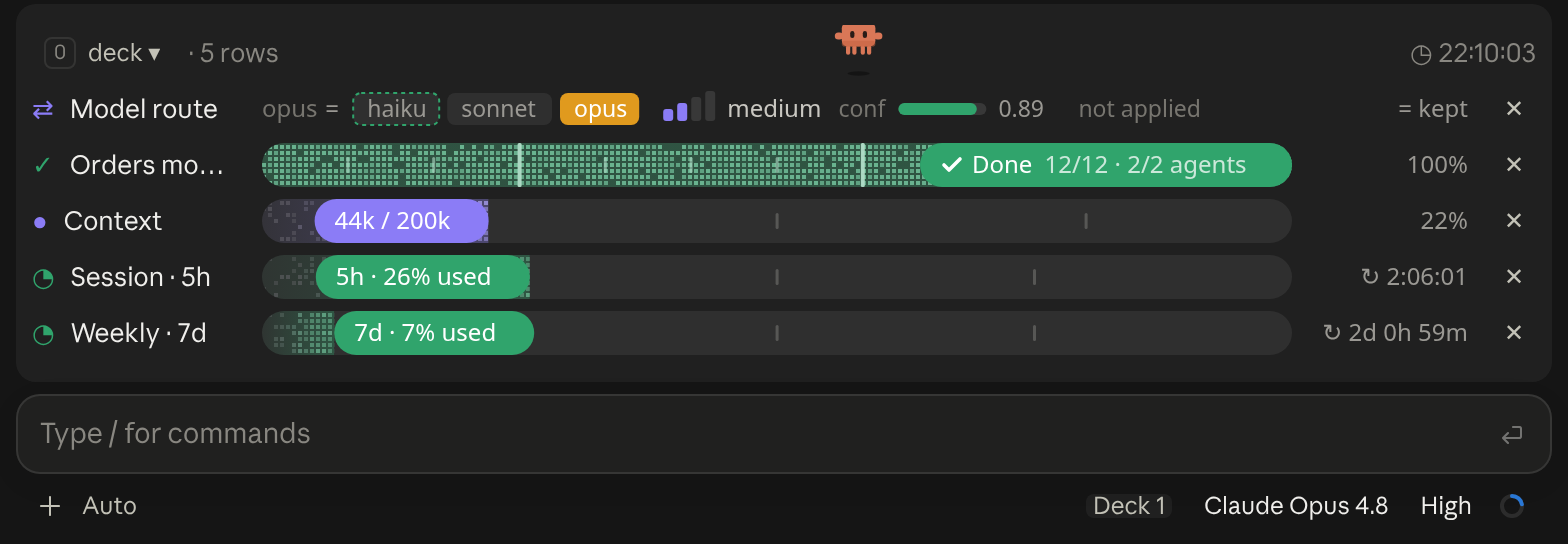
Deck in Claude Desktop

A cockpit for Claude Code: plan bars and subagent strips, context, usage limits with reset countdowns and burn rates, spend, the model route and a pet. Six bar styles, three collapsed looks. CLI and Desktop.

Terminal

[-] zZ ▀▄ ▄▀ ▄▄▀▀▀▀▀▀▀▀▀▀ ▀▀▀▄▄▄ ▀▀▀▀▀▀▀▀▀▀▀▀ ▀▀▀▀▀▀▀▀ ctx 22% [ Pet ♥ ] [ ⚙ ] [ ↻ Adventurer ] [ Hide ] ❯ 

Claude Desktop

Pixel Cat in Claude Desktop

A little pixel cat that wanders above the Claude Code prompt, watches your usage limits and announces when work finishes; or switch packs for an adventurer who mines, chops trees and fights zombies

Terminal

╭─────────────────────────────────────────────────────────────────────────────────────────────╮ [-] │ ◆ context 44k of 200k · compacts at 167k 22% │ │ ████████████████████────────────────────────────────────────────────────────░░░░░░░░░░░░░░░ │ │ ■ system prompt 1.9k 1% ■ system tools 28k 14% ■ skills 2k 1% ■ messages 12k 6% │ │ ─ free space 123k ░ autocompact buffer 33k │ ╰─────────────────────────────────────────────────────────────────────────────────────────────╯ ❯ 

Claude Desktop

Context Bar in Claude Desktop

Your context window as a stacked bar above the prompt, a color per category, with token counts and the compaction point. /context-bar shows or hides it.

Terminal

BURN ▁ ▂ *▂▆ ▃ $0.41 = 0.04 burritos [-] 5h 26% in 2h 5m ▅▄█▅▅▆█▆███▅█ opus 4.8 44k in 1k out wk 7% in 2d 0h █████████████░░░░░░░░░░░░░░░░░░░░░░░░░░░░░░░░░░░░ lifetime $0.41 hide ❯ 

Claude Desktop

Burn Meter in Claude Desktop

Live session cost odometer above the prompt: a burning fuse, real-world comparisons, threshold alerts