

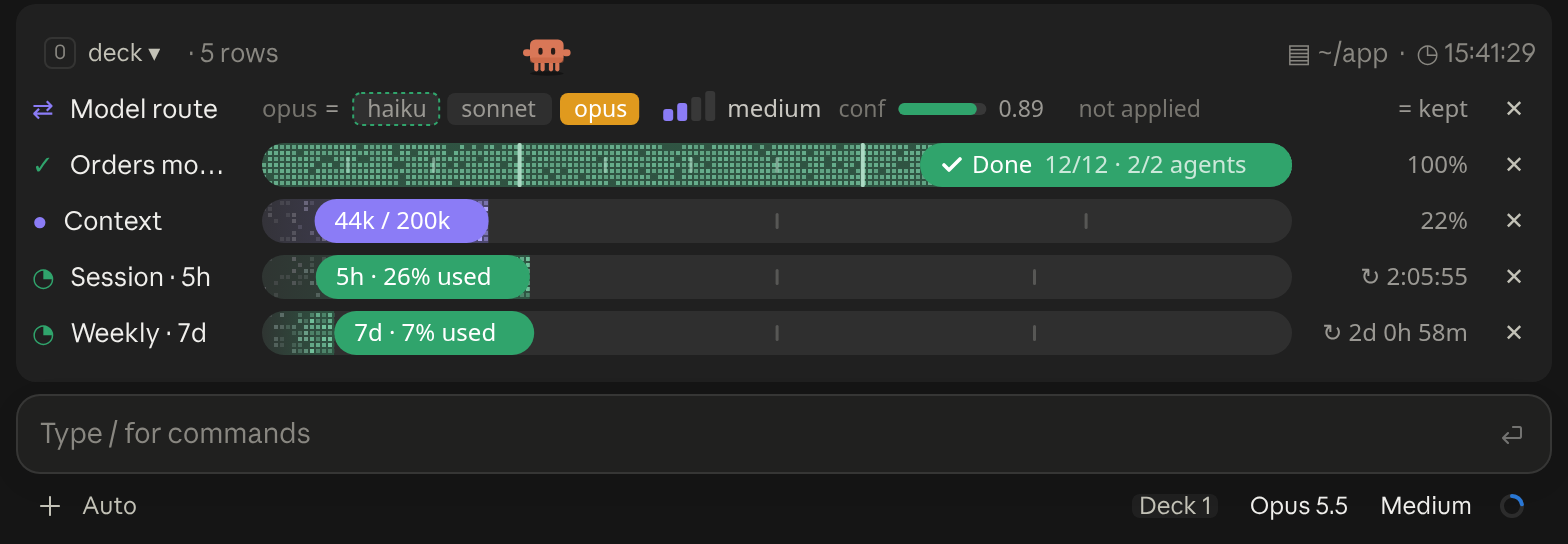
A cockpit for Claude Code: plan bars and subagent strips, context, usage limits with reset countdowns and burn rates, spend, the model route and a pet. Six bar styles, three collapsed looks. CLI and Desktop.
Persistent pinned memos and clickable todo checkboxes above the Claude Code prompt
0 installs
Terminal
  ⎿  pin-memo: 메모 #1 고정
  ⎿  pin-memo: 메모 #2 고정
  ⎿  pin-memo: 메모 #3 고정
╭─────────────────────────────────────────────────────────────────────────────────────────────╮ [-]
│ 📌 핀 3 (완료 1)                                                                            │
│ 1 · Remember to run tests                                                                   │
│ [ ]                                                                                        │
│  2 Check deployment secrets                                                                 │
│ [x]                                                                                        │
│  3 Update docs                                                                              │
╰─────────────────────────────────────────────────────────────────────────────────────────────╯
Claude Desktop
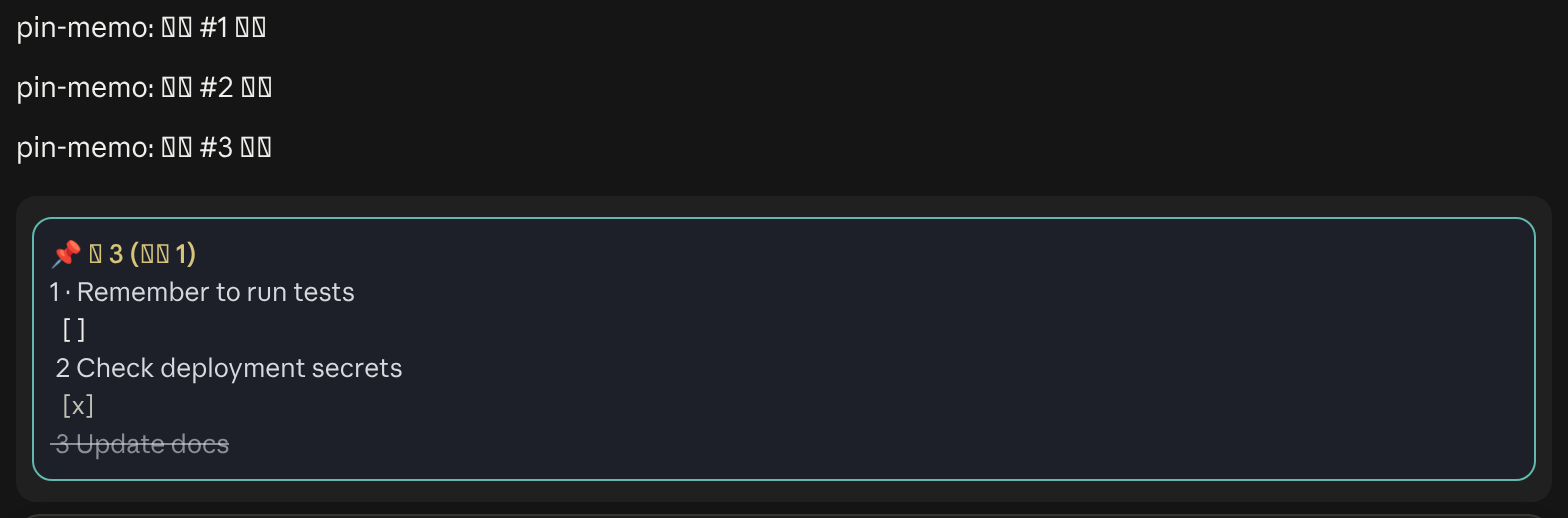
Pins notes and clickable todos in a band above the prompt with /pin. They come back when you resume the same session in the same folder.
A cockpit for Claude Code: plan bars and subagent strips, context, usage limits with reset countdowns and burn rates, spend, the model route and a pet. Six bar styles, three collapsed looks. CLI and Desktop.

Your context window as a stacked bar above the prompt, a color per category, with token counts and the compaction point. /context-bar shows or hides it.
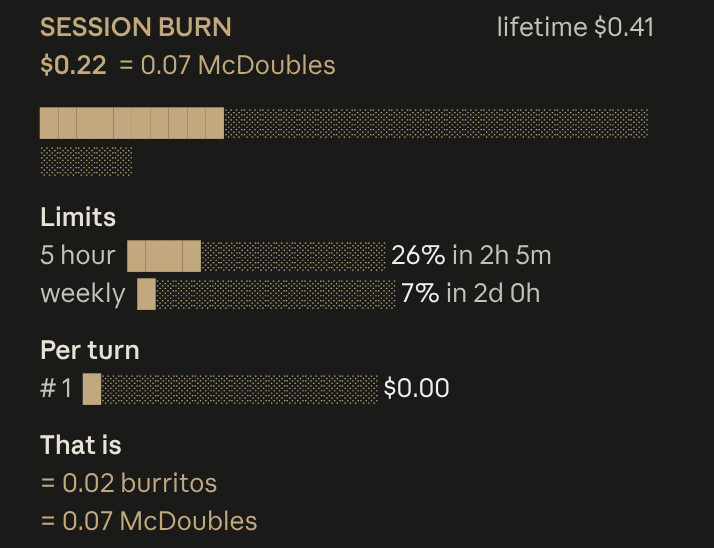
Live session cost odometer above the prompt: a burning fuse, real-world comparisons, threshold alerts

A control room above your prompt: background agents and shells, disk space and context at a glance. Two themes, loud and quiet. /stand toggles the list.
╭─ CONTEXT ────────────────────────────────────────────╮
│ ████▊░░░░░░░░░░░░░░░░░  22% of 200K  ·  GOOD         │
├─ STATS ──────────────────────────────────────────────┤
│ ↓ 44.0K  ↑ 1.4K  │  $0.41  │  ⏱ 10m 12s  │  +128/-34 │
├─ REPO ───────────────────────────────────────────────┤
│ ◆ Opus 4.8  ·  main  ·  16:21                        │
╰──────────────────────────────────────────────────────╯
A boxed multi-line panel with auto-sizing borders: a context section with a gradient bar and status word, a stats section (tokens, cost, duration, lines changed), and a repo section (model, git branch with file counts, clock, vim mode), in a terracotta Claude-brand palette.
Opus 4.8 [high] ~/app main
16:20:55 | ⛁ ██░░░░░░░░ 22% | 5h ●◔○○○ 26% ↻2h7m | 7d ◔○○○○○○ 7% ↻2d1h │ $0.41 ⏱ 10m
Two-line status with a block context bar and quarter-step dot meters (◔◑◕●) for the 5-hour and weekly limits (fill shows usage, color shows whether you are ahead of or behind pace), plus model, effort, git and cost. Needs no jq.
  Opus 4.8 high ✦ │ ctx 22% │ app (main) │ PR #1287 ● │ $0.41 · 10m +128 -34
  Session ● ● ● ● ● ● ● ● ○ ○ ○  74% left  Resets in 2h 6m
  Weekly  ● ● ● ● ● ● ● ● ● ● ○  93% left  Resets in 2d 0h
  Fable   ● ● ● ● ● ● ● ● ● ○ ○  85% left  Resets in 2d 0h
  ◐ Read:index.ts  ✓ Read×1  ✓ Bash×1  ✓ Edit×1  ✓ Grep×1
  ◐ code-reviewer Review the change for regressions
A header with model, context and burn rate per hour, then live tool and agent activity parsed from the session transcript.
Opus 4.8 │ ✍️ 22% │ app (main) │ ● high

current ●●○○○○○○○○  26% ⟳ 6:59pm
weekly  ○○○○○○○○○○   7% ⟳ aug 1, 5:52pm
Model, context, directory and branch up top; five-hour and weekly quota as dot bars with reset times underneath. Flags --dangerously-skip-permissions with a lightning bolt. By Kamran Ahmed of roadmap.sh.


