

Opus 4.8 [high] ~/app main
16:20:55 | ⛁ ██░░░░░░░░ 22% | 5h ●◔○○○ 26% ↻2h7m | 7d ◔○○○○○○ 7% ↻2d1h │ $0.41 ⏱ 10m
cc-statusbar
Model, context fill and both subscription windows as pace-coloured bars: the colour is the projected end-of-window usage, not the current percentage, so a nearly full window about to reset stays green.
Before you install
- This version was reviewed before it was listed on Aug 27, 2026
- Doesn't ask to connect to the internet
- It also writes rate_limits to ~/.claude/.cc-statusbar-quota.json, for a companion VS Code extension.
- Its header asks for Python 3.8 or newer and uses only the standard library.
- Bars stay green for the first 3% of a window, since there is too little data to project.
Preview
Clean repo
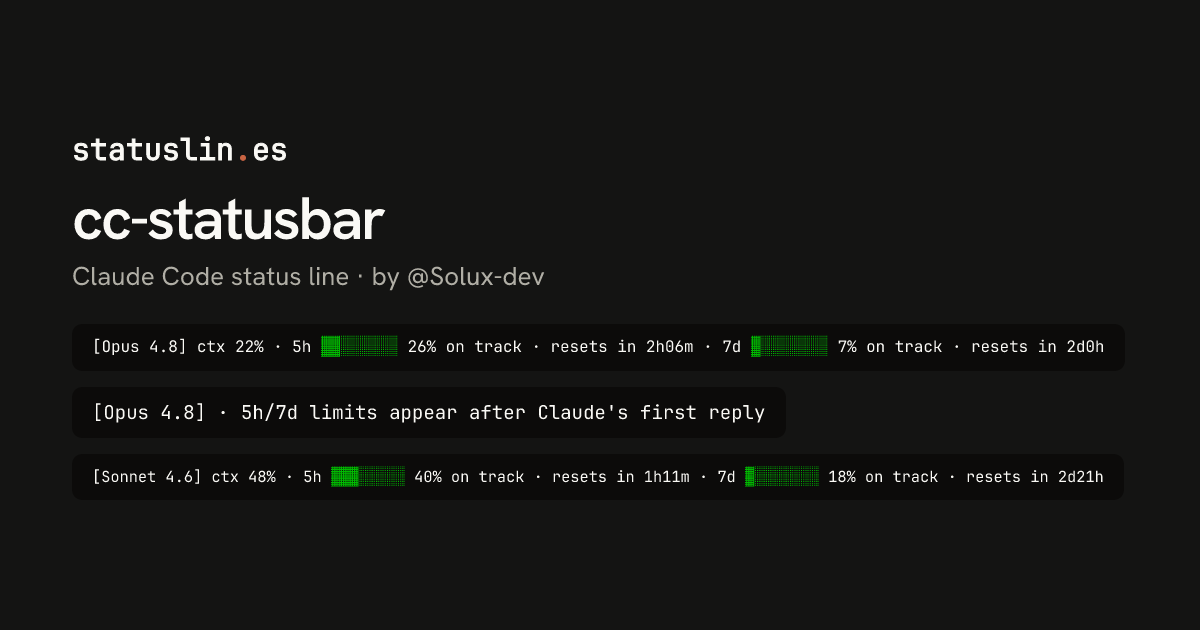
[Opus 4.8] ctx 22% · 5h ▓▓░░░░░░ 26% on track · resets in 2h06m · 7d ▓░░░░░░░ 7% on track · resets in 2d0h
New session
[Opus 4.8] · 5h/7d limits appear after Claude's first reply
Dirty branch
[Sonnet 4.6] ctx 48% · 5h ▓▓▓░░░░░ 40% on track · resets in 1h11m · 7d ▓░░░░░░░ 18% on track · resets in 2d21h
Near-full
[Opus 4.8] ctx 91% · 5h ▓▓▓▓▓▓▓░ 88% running tight · resets in 17m · 7d ▓▓▓▓▓░░░ 61% on track · resets in 19h59m
1M context
[Fable 5] ctx 64% · 5h ▓▓▓░░░░░ 33% over pace · resets in 3h29m · 7d ▓▓▓▓▓▓░░ 80% over pace · resets in 4d23h
Post-compact
[Haiku 4.5] · 5h ▓▓▓▓░░░░ 52% over pace · resets in 4h01m
Worktree
[Opus 4.8] ctx 37% · 5h ▓▓▓▓░░░░ 44% running tight · resets in 2h49m · 7d ▓▓░░░░░░ 20% on track · resets in 1d6h
Non-git
[Opus 4.8] ctx 22% · 5h/7d limits appear after Claude's first reply
What it does
Shows the model, context fill and your 5-hour and 7-day usage windows as 8-cell bars, colored by whether you are on pace to run out before each window resets.
- Written in
- Python
- Network access
- None requested
- Works in
- Terminal
How it works
- Reads the model name, context_window.used_percentage and both rate_limits windows.
- Projects end-of-window use from the percent used and the time left until resets_at.
- Under 90% projected is green "on track", up to 102% yellow "running tight", above it red.
- Before any rate limits arrive, a dim note says they appear after Claude's first reply.
Source
#!/usr/bin/env python3
"""Claude Code statusLine script + local quota bridge for the cc-statusbar extension.

Claude Code hands its statusLine hook a JSON payload on stdin after every
assistant message. That payload carries the REAL 5h/7d subscription limits
(`rate_limits`), read from the headers of Claude Code's own ongoing traffic —
no extra request, no extra token. The VS Code extension cannot see that stdin,
so this script mirrors those limits to a tiny local file that the extension
reads with zero network:

    ~/.claude/.cc-statusbar-quota.json

This is source 2 of the extension's four quota sources (see README →
"How it gets data"). It is entirely optional: without it the extension still
reads quota over the network. It matters on links too weak for a network call
to complete, because it costs no request at all.

Terminal sessions only. The VS Code / Cursor integration runs Claude Code
*without* a status line, so an IDE-only session never triggers this script.

Setup — add to ~/.claude/settings.json (adjust the path to where you put it):

    {
      "statusLine": {
        "type": "command",
        "command": "python ~/.claude/statusline.py"
      }
    }

Already have your own statusLine script? Keep it, and copy just
`dump_quota_bridge()` plus its call at the end of `main()` into it — the bridge
is independent of whatever your script prints.

Requires Python 3.8+. No third-party packages. Windows, macOS and Linux.
"""

from __future__ import annotations

import json
import sys
import time
from pathlib import Path

# Where the extension looks for the mirrored limits. Must match
# src/localQuota.ts → bridgePath(). Do not rename without changing both.
QUOTA_BRIDGE_PATH = Path.home() / ".claude" / ".cc-statusbar-quota.json"

# Windows consoles default to a legacy code page, so the block glyphs below
# would raise UnicodeEncodeError and the status line would show nothing.
if sys.platform == "win32":
    try:
        sys.stdout.reconfigure(encoding="utf-8", errors="replace")
    except Exception:
        pass

GREEN = "\033[32m"
YELLOW = "\033[33m"
RED = "\033[31m"
DIM = "\033[2m"
RESET = "\033[0m"


def fmt_remaining(seconds: float) -> str:
    """Countdown to a window reset: '38m' / '2h41m' / '4d3h'."""
    secs = int(seconds)
    if secs <= 0:
        return "—"
    days, rem = divmod(secs, 86_400)
    hours, rem = divmod(rem, 3_600)
    mins = rem // 60
    if days:
        return f"{days}d{hours}h"
    if hours:
        return f"{hours}h{mins:02d}m"
    return f"{mins}m"


def quota_segment(label: str, window: object, now: float, window_seconds: int) -> "str | None":
    """One quota window as a pace-coloured bar: '5h ▓▓▓░░░░░ 34% on track · resets in 2h41m'.

    The colour is the projected end-of-window usage, not the current percentage:
    a nearly full window that is about to reset is normal, not an alarm.
        green  — projected under 90%
        yellow — projected 90-102% (lands right on the limit)
        red    — projected over 102% (on pace to run out before the reset)
    Skipped during the first 3% of a window: too little data to extrapolate.
    Returns None when the window is missing from the payload.
    """
    if not isinstance(window, dict):
        return None
    pct = window.get("used_percentage")
    if not isinstance(pct, (int, float)):
        return None
    pct = float(pct)

    color, status, reset_txt = GREEN, "on track", ""
    resets_at = window.get("resets_at")
    if isinstance(resets_at, (int, float)):
        remaining = resets_at - now
        reset_txt = f" · resets in {fmt_remaining(remaining)}"
        elapsed = (window_seconds - remaining) / window_seconds
        if 0.03 < elapsed <= 1 and remaining > 0:
            projected = pct / elapsed
            if projected > 102:
                color, status = RED, "over pace"
            elif projected >= 90:
                color, status = YELLOW, "running tight"

    width = 8
    filled = max(0, min(width, round(pct / 100 * width)))
    bar = "▓" * filled + "░" * (width - filled)
    return f"{label} {color}{bar}{RESET} {pct:.0f}% {status}{reset_txt}"


def build_status_line(data: dict, now: "float | None" = None) -> str:
    """Compact one-line status: model, context fill, then both quota windows."""
    if now is None:
        now = time.time()

    model = (data.get("model") or {}).get("display_name") or "model?"
    ctx = data.get("context_window") or {}
    limits = data.get("rate_limits") or {}

    ctx_pct = ctx.get("used_percentage")
    head = f"[{model}]"
    if isinstance(ctx_pct, (int, float)):
        head += f" ctx {float(ctx_pct):.0f}%"

    segments = [
        quota_segment("5h", limits.get("five_hour"), now, 5 * 3600),
        quota_segment("7d", limits.get("seven_day"), now, 7 * 86_400),
    ]
    segments = [s for s in segments if s]
    if not segments:
        return f"{head} · {DIM}5h/7d limits appear after Claude's first reply{RESET}"
    return head + " · " + " · ".join(segments)


def render(raw: str) -> str:
    """Raw stdin to the line we print. All error handling lives here."""
    if not raw.strip():
        return "[statusline] no input"
    try:
        data = json.loads(raw)
    except Exception:
        return "[statusline] invalid json"
    if not isinstance(data, dict):
        return "[statusline] unexpected payload"
    try:
        return build_status_line(data)
    except Exception:
        return "[statusline] render error"


def dump_quota_bridge(raw: str, now: "float | None" = None) -> None:
    """Mirror the stdin `rate_limits` to QUOTA_BRIDGE_PATH for the extension.

    Best-effort and isolated: every failure is swallowed, and this runs only
    after the status line is already on stdout, so the bridge can never break
    what you see. Writes only when at least one window carries a real
    `used_percentage`, so an early render before the first API response never
    overwrites a good last-known reading. The write is atomic (temp file plus
    rename), so the extension never reads a half-written file.
    """
    try:
        data = json.loads(raw)
        if not isinstance(data, dict):
            return
        limits = data.get("rate_limits") or {}
        windows = [limits.get("five_hour"), limits.get("seven_day")]
        if not any(isinstance(w, dict) and w.get("used_percentage") is not None for w in windows):
            return
        payload = {
            "writtenAtSec": int(now if now is not None else time.time()),
            "rate_limits": limits,
        }
        QUOTA_BRIDGE_PATH.parent.mkdir(parents=True, exist_ok=True)
        tmp = QUOTA_BRIDGE_PATH.with_name(QUOTA_BRIDGE_PATH.name + ".tmp")
        tmp.write_text(json.dumps(payload), encoding="utf-8")
        tmp.replace(QUOTA_BRIDGE_PATH)
    except Exception:
        pass


def main() -> None:
    try:
        raw = sys.stdin.read()
    except Exception:
        raw = ""

    try:
        sys.stdout.write(render(raw) + "\n")
    except Exception:
        # Last resort: never leave the status line blank on an encoding error.
        print("[statusline] render error")

    dump_quota_bridge(raw)


if __name__ == "__main__":
    main()
Badge for your README
Own this listing? Add it to your README. The badge shows the install count as it grows.

[](https://statuslin.es/c/cc-statusbar-a1eb8593?utm_source=readme-badge)
Or show the preview card:
[](https://statuslin.es/c/cc-statusbar-a1eb8593?utm_source=readme-badge)
More status lines
████▊░░░░░░░░░░░░░░░░░ 22% of 200K · GOOD │ ↓ 44.0K ↑ 1.4K │ $0.41 │ ⏱ 10m 12s │ +128/-34 │ 5h 26% ↻2h06m │ 7d 7% ↻2d0h │ ◆ Opus 5.5 · main · 03:53
  Opus 4.8 high ✦ │ ctx 22% │ app (main) │ PR #1287 ● │ $0.41 · 10m +128 -34
  Session ● ● ● ● ● ● ● ● ○ ○ ○  74% left  Resets in 2h 6m
  Weekly  ● ● ● ● ● ● ● ● ● ● ○  93% left  Resets in 2d 0h
  Fable   ● ● ● ● ● ● ● ● ● ○ ○  85% left  Resets in 2d 0h
  ◐ Read:index.ts  ✓ Read×1  ✓ Bash×1  ✓ Edit×1  ✓ Grep×1
  ◐ code-reviewer Review the change for regressions
Model: Opus 4.8 | Thinking: high | Context: [▰▰▱▱▱▱▱▱▱▱] 45k/200k (22%) | cwd: ~/app | ⎇ main | (+0,-0)
Cost: $0.41 | Block: 2hr 6m | Weekly: 7.0% | Session: 10m | In: 916.7 t/s | Out: 29.2 t/s | Cached: 2k | Session: [▰▱▱▱▱] 26.0%
Mem: 0.8G/1.0G | (*゚∀゚*) | Session ID: b8e1c0d2-4a6f-4e2a-9c1b-3f5d7a9e2c10
庫 app · 枝 main · 脳 OPUS-4.8
文 ▓▓░░░░░░ 22% · 時 ▓▓░░┃░░░ 26% · 週 ▓░░░░┃░░ 7%
Opus 4.8 (200K) high                    |  app (main)
██░░░░░░░░ 22% 200K |  5h 26% ⇣32% 2h  7d 7% ⇣63% 2d
Related mods


One line above the prompt: context tokens with their weather, a bar per recent prompt, your 5-hour and 7-day limits against the time elapsed, the prompt cache with its time left, the session cost with the last prompt's share in dollars and in points of the 5-hour limit, the subagents running, and a one-click pill for the GOs Claude proposes. Labels in English, French or Russian. After Token Weather (Anthropic, Apache-2.0) and the ideas of usage-meter (HolyGrail) and prompt-cache-control (Daniel San).

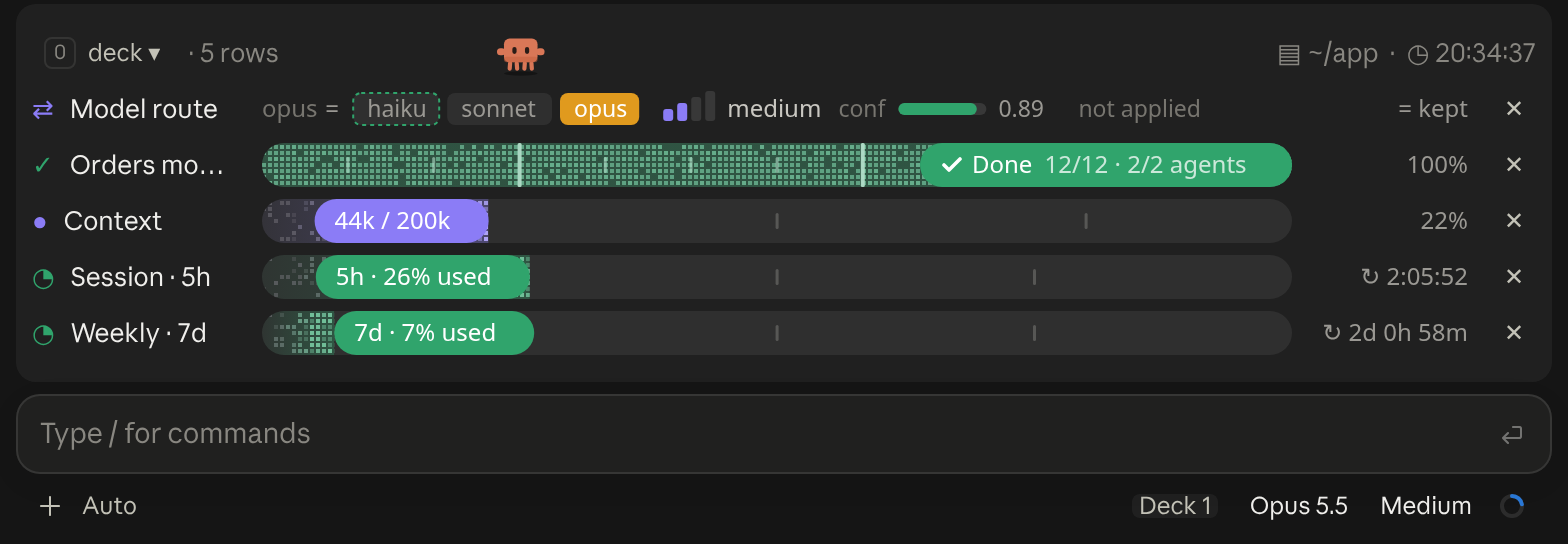
A cockpit for Claude Code: plan bars and subagent strips, context, usage limits with reset countdowns and burn rates, spend, the model route and a pet. Six bar styles, three collapsed looks. CLI and Desktop.

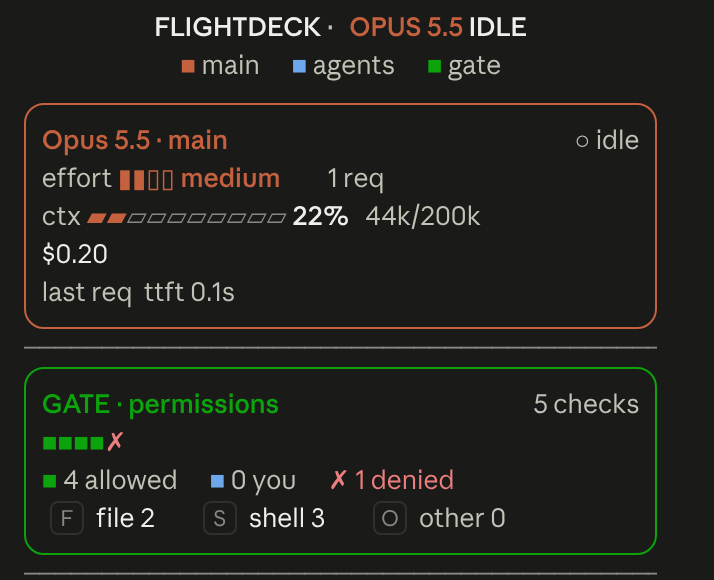
Flightdeck: a live agent dashboard for Claude Code. Main model vitals, an on-call architect, every permission check, subagent cards and swimlanes, a turn receipt and a session log, all from real session events


An animated pixel-art companion above your prompt that reacts to your session and your typing, with a live context meter.