

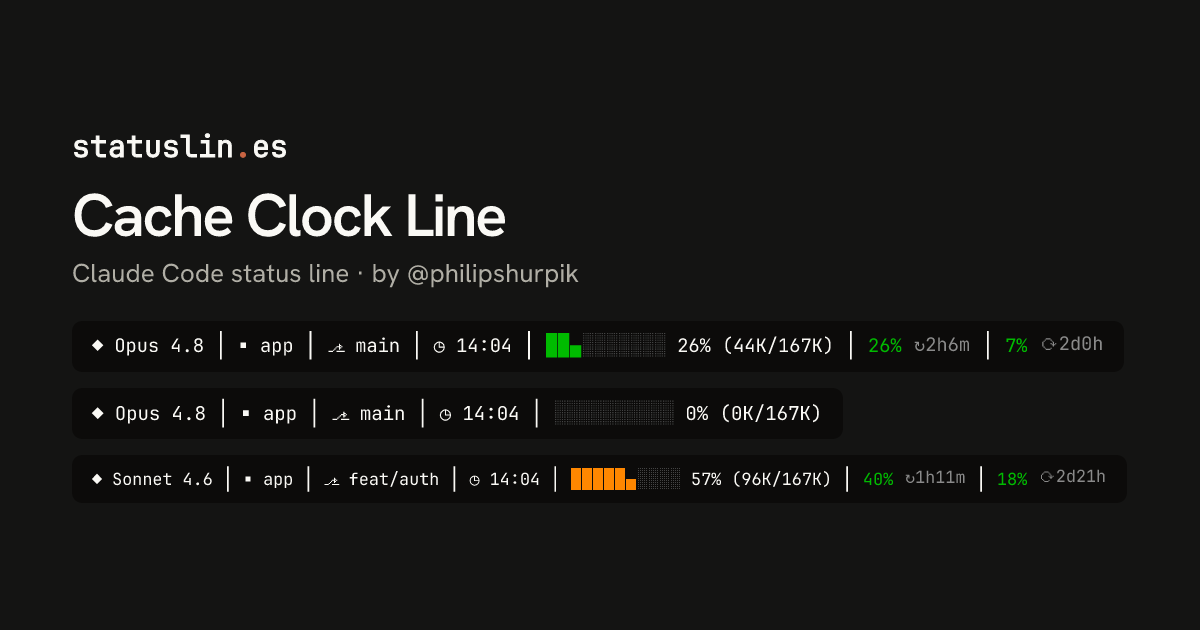
◆ Opus 4.8 │ ▪ app │ ⎇ main │ ◷ 14:04 │ ██▄░░░░░░░ 26% (44K/167K) │ 26% ↻2h6m │ 7% ⟳2d0hCache Clock Line
One line in Node: model, project, branch, the time of the last token change (to judge prompt-cache expiry), a context bar measured against the usable window, and five-hour and seven-day usage with reset countdowns. No network calls. Overwrites one small state file in the system temp folder on each render.
Before you install
- This version was reviewed before it was listed on Oct 18, 2026
- Doesn't ask to connect to the internet
- Overwrites claude-status-line-state.json in the OS temp folder on every render and never removes it.
- That one file is shared by all sessions, so two open sessions keep resetting each other's clock.
- Near a full window the bar pins at 100% and the count can pass the window, as in 182K/167K.
Preview
Clean repo
◆ Opus 4.8 │ ▪ app │ ⎇ main │ ◷ 14:04 │ ██▄░░░░░░░ 26% (44K/167K) │ 26% ↻2h6m │ 7% ⟳2d0hNew session
◆ Opus 4.8 │ ▪ app │ ⎇ main │ ◷ 14:04 │ ░░░░░░░░░░ 0% (0K/167K)Dirty branch
◆ Sonnet 4.6 │ ▪ app │ ⎇ feat/auth │ ◷ 14:04 │ █████▄░░░░ 57% (96K/167K) │ 40% ↻1h11m │ 18% ⟳2d21hNear-full
◆ Opus 4.8 │ ▪ app │ ⎇ main │ ◷ 14:04 │ ██████████ 100% (182K/167K) │ 88% ↻17m │ 61% ⟳19h59m1M context
◆ Fable 5 │ ▪ app │ ⎇ main │ ◷ 14:04 │ ██████▄░░░ 66% (640K/967K) │ 33% ↻3h29m │ 80% ⟳4d23hPost-compact
◆ Haiku 4.5 │ ▪ app │ ⎇ main │ ◷ 14:04 │ ░░░░░░░░░░ 0% (0K/167K) │ 52% ↻4h1mWorktree
◆ Opus 4.8 │ ▪ feature │ ⎇ worktree-feature │ ◷ 14:04 │ ████▄░░░░░ 44% (74K/167K) │ 44% ↻2h49m │ 20% ⟳1d6hNon-git
◆ Opus 4.8 │ ▪ scratch │ ◷ 14:04 │ ██▄░░░░░░░ 26% (44K/167K)What it does
One line with model, project, git branch, the clock time your token count last changed, a context bar, and five-hour and seven-day usage with reset countdowns.
- Written in
- Node.js
- Network access
- None requested
- Works in
- Terminal
How it works
- Reads model, cwd, context use and rate limits, then runs git branch --show-current.
- Measures context against the window minus 33,000 tokens, so 200K shows as 167K.
- The ◷ time stays put until the token count moves, using a saved copy of the last count.
- Turns the bar yellow at 60K tokens and orange at 80K, whatever the window size.
Source
#!/usr/bin/env node

const path = require('path');
const fs = require('fs');
const os = require('os');
const { execSync } = require('child_process');

const STATE_FILE = path.join(os.tmpdir(), 'claude-status-line-state.json');
const AUTOCOMPACT_BUFFER_TOKENS = 33_000;
const WARN_TOKENS = 60_000;
const COMPACT_TOKENS = 80_000;

const RST = '\x1b[0m';
const DIM = '\x1b[38;5;238m';
const MUTED = '\x1b[38;5;245m';

function formatDuration(epoch) {
  if (!epoch) return '';
  const diff = Math.max(0, Math.round(epoch - Date.now() / 1000));
  if (diff <= 0) return 'now';
  if (diff < 60) return '<1m';
  const d = Math.floor(diff / 86400);
  const h = Math.floor((diff % 86400) / 3600);
  const m = Math.floor((diff % 3600) / 60);
  if (d > 0) return `${d}d${h}h`;
  return h > 0 ? `${h}h${m}m` : `${m}m`;
}

function rateLimitColor(pct) {
  return pct > 80 ? '\x1b[31m' : pct > 50 ? '\x1b[33m' : '\x1b[32m';
}

function formatRateLimit(rl, icon) {
  if (rl?.used_percentage == null) return '';
  const pct = Math.round(rl.used_percentage);
  const reset = formatDuration(rl.resets_at);
  let part = ` │ ${rateLimitColor(pct)}${pct}%${RST}`;
  if (reset) part += ` ${MUTED}${icon}${reset}${RST}`;
  return part;
}

let input = '';
process.stdin.setEncoding('utf8');
process.stdin.on('data', (chunk) => { input += chunk; });
process.stdin.on('end', () => {
  try {
    const data = JSON.parse(input);
    const ctx = data.context_window || {};
    const model = data.model || {};
    const cwd = data.cwd || '';

    const windowSize = ctx.context_window_size ?? 200000;
    const effectiveWindow = windowSize - AUTOCOMPACT_BUFFER_TOKENS;
    const rawUsedPct = ctx.used_percentage ?? 0;
    const tokensUsed = Math.round((rawUsedPct / 100) * windowSize);
    const usedPct = Math.min(100, Math.round((tokensUsed / effectiveWindow) * 100));
    const level = tokensUsed >= COMPACT_TOKENS ? 'danger' : tokensUsed >= WARN_TOKENS ? 'warn' : 'ok';
    const color = level === 'danger' ? '\x1b[38;5;208m' : level === 'warn' ? '\x1b[33m' : '\x1b[32m';

    const project = cwd ? path.basename(cwd) : '';
    let branch = '';
    if (cwd) {
      try {
        branch = execSync('git --no-optional-locks branch --show-current',
          { cwd, encoding: 'utf8', stdio: ['pipe', 'pipe', 'pipe'] }).trim().slice(0, 30);
      } catch { /* not a git repo */ }
    }

    const bar = Array.from({ length: 10 }, (_, i) => {
      const filled = usedPct - i * 10;
      const char = filled >= 8 ? '█' : filled >= 3 ? '▄' : null;
      return char ? `${color}${char}${RST}` : `${DIM}░${RST}`;
    }).join('');

    let lastCallMs;
    try {
      const prev = JSON.parse(fs.readFileSync(STATE_FILE, 'utf8'));
      lastCallMs = prev.tokensUsed === tokensUsed ? prev.timestamp : Date.now();
    } catch { lastCallMs = Date.now(); }
    fs.writeFileSync(STATE_FILE, JSON.stringify({ tokensUsed, timestamp: lastCallMs }));
    const last = new Date(lastCallMs);
    const time = `${String(last.getHours()).padStart(2, '0')}:${String(last.getMinutes()).padStart(2, '0')}`;
    const tokensK = (tokensUsed / 1000).toFixed(0);
    const windowK = (effectiveWindow / 1000).toFixed(0);

    let output = `◆ ${(model.display_name ?? 'Claude').replace(/\(1M context\)/, '1M').trim()}`;
    if (project) output += ` │ ▪ ${project}`;
    if (branch) output += ` │ ⎇ ${branch}`;
    output += ` │ ◷ ${time}`;
    output += ` │ ${bar} ${usedPct}% (${tokensK}K/${windowK}K)`;

    const rateLimits = data.rate_limits || {};
    output += formatRateLimit(rateLimits.five_hour, '↻');
    output += formatRateLimit(rateLimits.seven_day, '⟳');

    process.stdout.write(output);
  } catch {
    process.stdout.write('Ctx: --');
  }
});
Badge for your README
Own this listing? Add it to your README. The badge shows the install count as it grows.

[](https://statuslin.es/c/cache-clock-line-7f2a97e8?utm_source=readme-badge)
Or show the preview card:
[](https://statuslin.es/c/cache-clock-line-7f2a97e8?utm_source=readme-badge)
More status lines
Op 4.8 │ app (main) │ █░░░░ 44k/200k │ cache 5% ↓2k +5k │ 5h:26%(2h7m) │ 7d:7%(2d)[Opus 5.5] 📁 app | 🌿 main | $0.41 | ⏱️ 10m 12s
❤️❤️❤️❤️❤️❤️❤️🖤🖤🖤 26% 2h6m 🍗🍗🍗🍗🍗🍗🍗🍗🍗🦴 7% 2d0h
🟩🟩🟩🟩🟩⬛⬛⬛⬛⬛⬛⬛⬛⬛⬛⬛⬛⬛⬛⬛⬛⬛⬛⬛⬛⬛ 22%
Opus 4.8 · high · app (main) · ctx 44k · 5h 26% · 7d 7% · $0.41
╭─────────────────────────────────────────────────────────────────────────────────────────────────────────────────────────────────────────╮
│ ▐ Opus 4.8 ▌ ▐ high ▌ ▐ …/user/app ▌ ▐ main ▌ ▐ 22% / 200k ━━━━━━━━━━ ▌ ▐ 26% ━━━━━━━━━━ 16:10 ▌ ▐ +128 −34 ▌ ▐ $0.41 ▌ ▐ 10m 12s ▌ │
│ MODEL EFFORT PATH BRANCH CONTEXT USAGE DIFF COST TIME │
╰─────────────────────────────────────────────────────────────────────────────────────────────────────────────────────────────────────────╯
┌─────────────────────────────────────────────────────────────────────────────────┬────────────────────────────────┐
│ session summary session b8e1c0d2                                                │                                │
├──────────────────────────┬──────────────────────────────────────────────────────┤                                │
│ 📁 user/app  +0 -0 lines │ Opus 5.5  effort high  · 0min                        │                                │
│ app main                 │ cost $0.00 (all time) · $0.00 (this session)         │                                │
├──────────────────────────┴──────────────────────────────────────────────────────┤                                │
│ tokens 0 (all time) · 0 (this session)  context ██░░░░░░░░ 22%  compact 0 times │                                │
├─────────────────────────────────────────────────────────────────────────────────┤                                │
│ 5h-quota ███░░░░░░░ 26% resets 2h6m     7d-quota █░░░░░░░░░ 7% resets 2d0h      │                                │
└─────────────────────────────────────────────────────────────────────────────────┴────────────────────────────────┘
Related mods


Shows branch safety, context headroom, and account usage in a compact session telemetry strip


One line above the prompt: context tokens with their weather, a bar per recent prompt, your 5-hour and 7-day limits against the time elapsed, the prompt cache with its time left, the session cost with the last prompt's share in dollars and in points of the 5-hour limit, the subagents running, and a one-click pill for the GOs Claude proposes. Labels in English, French or Russian. After Token Weather (Anthropic, Apache-2.0) and the ideas of usage-meter (HolyGrail) and prompt-cache-control (Daniel San).

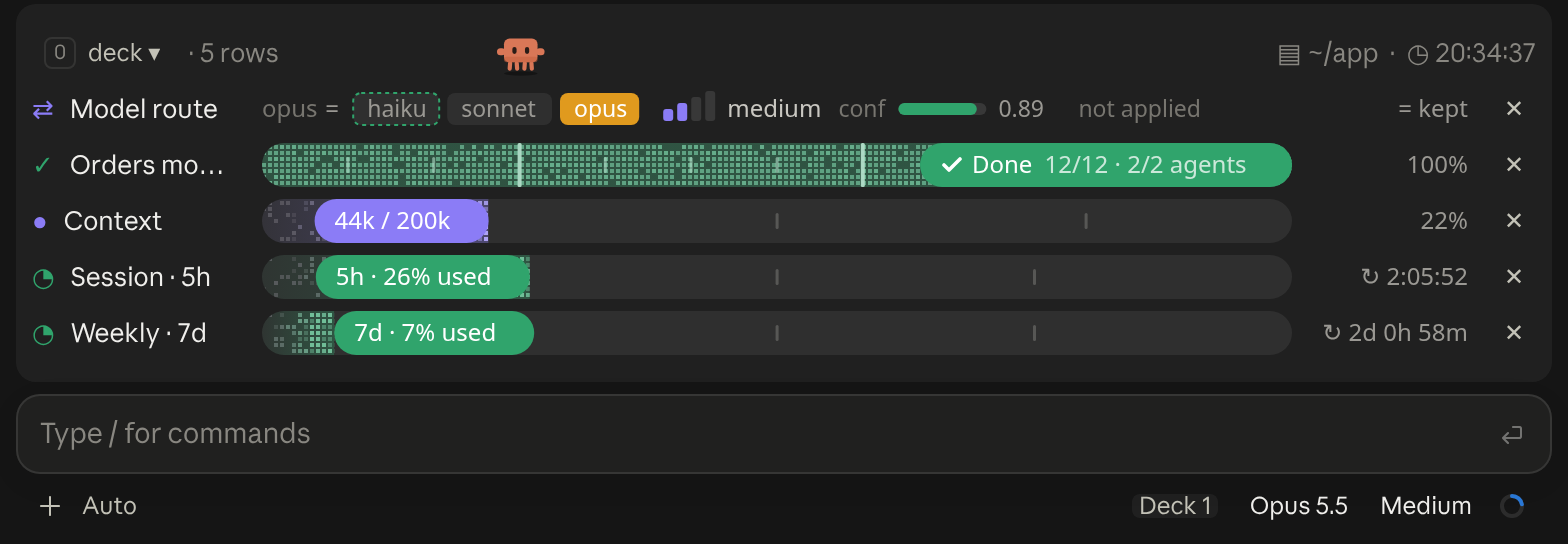
A cockpit for Claude Code: plan bars and subagent strips, context, usage limits with reset countdowns and burn rates, spend, the model route and a pet. Six bar styles, three collapsed looks. CLI and Desktop.

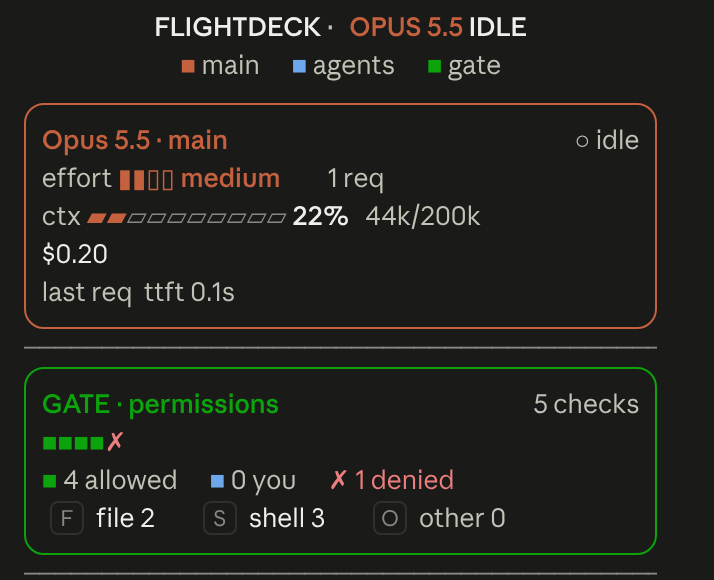
Flightdeck: a live agent dashboard for Claude Code. Main model vitals, an on-call architect, every permission check, subagent cards and swimlanes, a turn receipt and a session log, all from real session events