

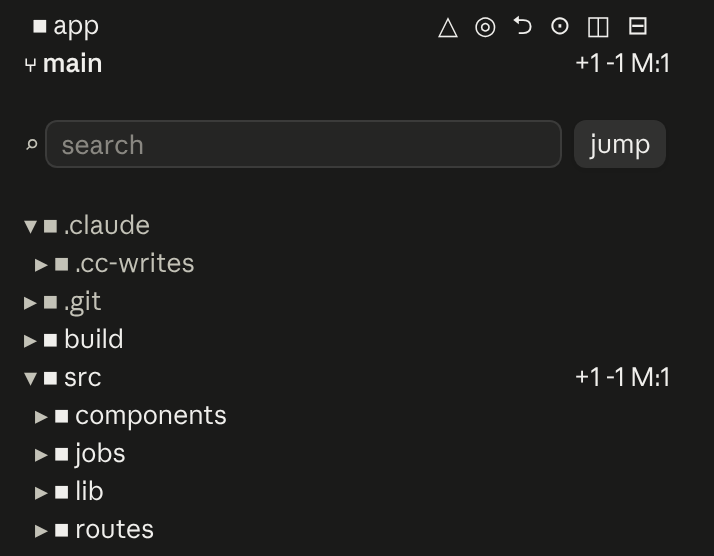
An IDE-style file tree for Claude Code that shows what Claude is doing and where in files
See what Claude Code is doing in a side pane
A side pane for the current chat that shows what Claude is doing, what's waiting on you, and what it's using: the to-do list, tasks Claude gives you, answered in place, subagents, background processes, connectors, context files and skills of this chat, in one side pane; the plan band above the prompt
Terminal
  ⎿  scenario-feed+chat-sidecar:
  ⎿  chat-sidecar: Opened the Sidecar pane.
╭────────────────────────────────────────────────────────────────────────────────────────────────✕─╮
│ Sidecar                                                                  [ ⚙ Settings ] [ Hide ] │
│ ╭──────────────────────────────────────────────────────────────────────────────────────────────╮ │
│ │ ▾ To-do                                                                                      │ │
│ │ No to-do list yet. Claude makes one for any task with 1 or more steps.                       │ │
│ ╰──────────────────────────────────────────────────────────────────────────────────────────────╯ │
│ ╭──────────────────────────────────────────────────────────────────────────────────────────────╮ │
│ │ ▾ Tasks for me                                                                               │ │
│ │ Nothing waiting for you.                                                                     │ │
╰──────────────────────────────────────────────────────────────────────────────────────────────────╯
Claude Desktop
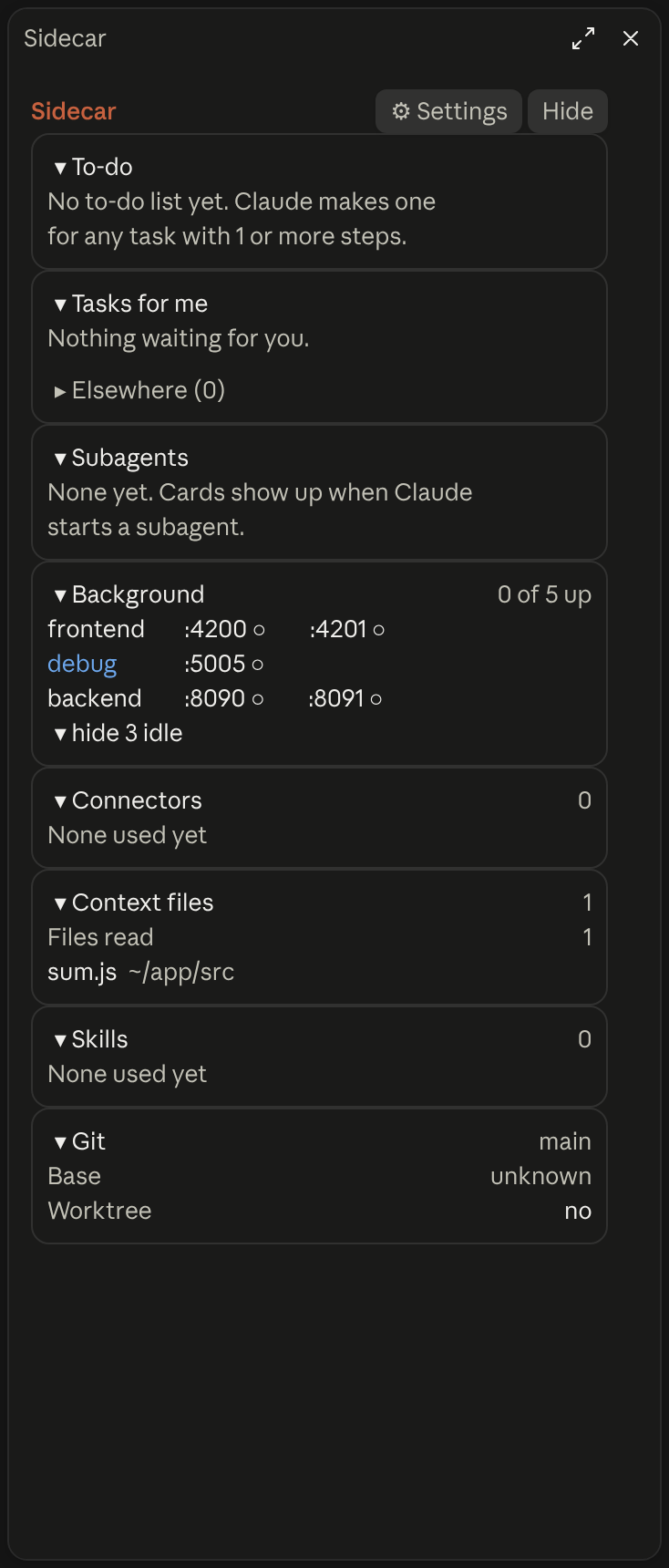
A side pane that shows what the current chat is doing: Claude's to-do list, tasks it gives you to answer in place, subagents, background processes, and what the chat used.
Install chat-sidecar. The pane opens by itself when the terminal is about 110 to 144 columns wide; otherwise run /chat-sidecar. Claude keeps its steps with the mod's plan tool, which draws the to-do list in the pane and a progress band above the prompt.
Add "chat-sidecar": false to ~/.claude/mods/switches.json, and Claude is then told it cannot assign tasks. To only hide the pane, press Hide at the top of it; /chat-sidecar brings it back.
statuslin.es's checks found it contacts no internet service. Its README says the only commands it runs are netstat or ss and tasklist for ports, PowerShell Get-CimInstance or ps for test runs, and read-only git commands, and that tasks stay in Claude Code's plugin store on your machine.
An IDE-style file tree for Claude Code that shows what Claude is doing and where in files

Shows branch safety, context headroom, and account usage in a compact session telemetry strip
╭─ CONTEXT ────────────────────────────────────────────╮
│ ████▊░░░░░░░░░░░░░░░░░  22% of 200K  ·  GOOD         │
├─ STATS ──────────────────────────────────────────────┤
│ ↓ 44.0K  ↑ 1.4K  │  $0.41  │  ⏱ 10m 12s  │  +128/-34 │
├─ REPO ───────────────────────────────────────────────┤
│ ◆ Opus 4.8  ·  main  ·  16:21                        │
╰──────────────────────────────────────────────────────╯
A boxed multi-line panel with auto-sizing borders: a context section with a gradient bar and status word, a stats section (tokens, cost, duration, lines changed), and a repo section (model, git branch with file counts, clock, vim mode), in a terracotta Claude-brand palette.
app · main · Opus-4.8 · effort high · ctx 22% · 5h 26% ↻2h6m · 7d 7% ↻2d0hOne-line status bar showing your directory, git branch (with a * when dirty), model, live effort level, context-window usage, and 5-hour/7-day rate-limit usage.
Opus 4.8 [high] ~/app main
16:20:55 | ⛁ ██░░░░░░░░ 22% | 5h ●◔○○○ 26% ↻2h7m | 7d ◔○○○○○○ 7% ↻2d1h │ $0.41 ⏱ 10m
Two-line status with a block context bar and quarter-step dot meters (◔◑◕●) for the 5-hour and weekly limits (fill shows usage, color shows whether you are ahead of or behind pace), plus model, effort, git and cost. Needs no jq.
████▊░░░░░░░░░░░░░░░░░ 22% of 200K · GOOD │ ↓ 44.0K ↑ 1.4K │ $0.41 │ ⏱ 10m 12s │ +128/-34 │ 5h 26% ↻2h06m │ 7d 7% ↻2d0h │ ◆ Opus 5.5 · main · 03:53
One-line adaptation of @kyleledbetter's Dreambase Panel: a context bar with status word, token/cost/duration/lines-changed stats, and model + git branch + clock, all on a single line in a terracotta Claude-brand palette.


